 3d88a3615a
Introduce IPropertyGroupProvider interface that lets QObjects declare which group each property belongs to. PropertyEditor then renders collapsible group headers in the tree view, with properties sorted under their respective groups. Key changes: - New IPropertyGroupProvider interface (getPropertyGroup method) - QDetailsViewRow_Group row type with bold group header rendering - isGroup model role and delegate property for styled group rows - TapHandler-based expand/collapse toggle in delegate template - One-time C++ auto-expand for groups in setObject() to avoid re-expansion loop with delegate recreation - Grouped property children added via LayoutBuilder::addGroup() - GraphicsBusSectionItem demonstrates grouping with 5 categories Co-Authored-By: Claude Opus 4.7 <noreply@anthropic.com> |
||
|---|---|---|
| .. | ||
| example | ||
| resources | ||
| source | ||
| CMakeLists.txt | ||
| README.md | ||
| README_zh.md | ||
| resources.qrc | ||
README.md
QDetailsView
Inspired by the details view of Unreal Engine, QDetailsView leverages Qt's reflection system to easily build property editors for qobject.
Its core features are:
- Create type-based control editors that automatically organize the editor layout according to the reflection structure of the object.
- Utilize QML GPU rendering and control management based on the preview view.
Usage
It is extremely easy to use—simply declare the meta-properties of a QObject using Q_PROPERTY(...):
class QCustomObject : public QObject {
    Q_OBJECT
    Q_PROPERTY(int Int READ getInt WRITE setInt)
    Q_PROPERTY(float Float READ getFloat WRITE setFloat)
    ...
};
QCustomObject obj;
QDetailsView view;
view.setObject(&obj);
view.show();
You will get the following result:
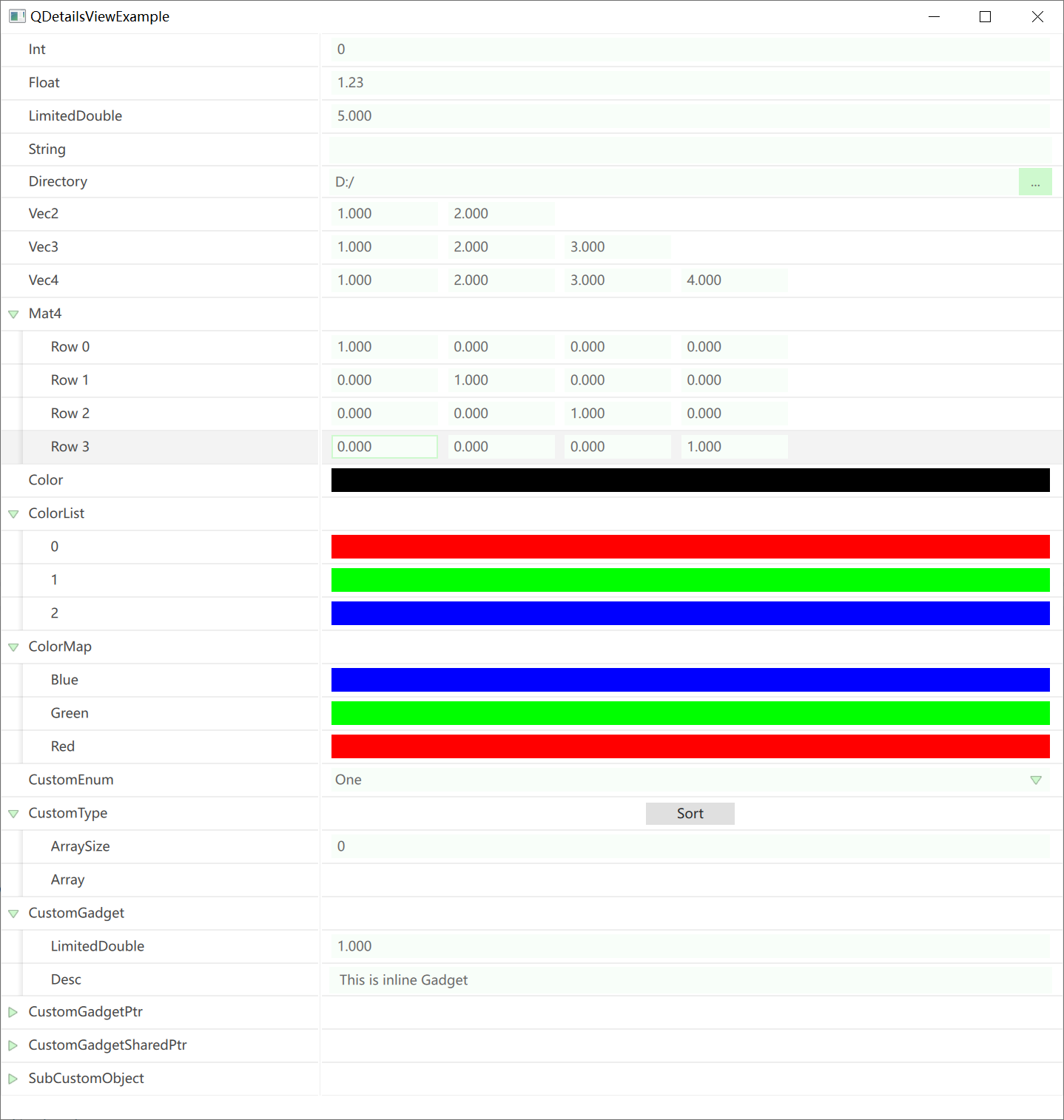
Customization
About QPropertyHandle
QPropertyHandle serves as the unified entry point for QDetailsView to manipulate properties. It is typically constructed via the following interface:
static QPropertyHandle* QPropertyHandle::FindOrCreate(
    QObject* inParent,      // Parent object that manages the lifecycle of the PropertyHandle
    QMetaType inType,       // Meta-type of the property
    QString inPropertyPath, // Path field of the property
    Getter inGetter,        // Getter function for the property
    Setter inSetter         // Setter function for the property
);
To ensure that changes to property values are detected by DetailsView, all value modifications must use the interface provided by PropertyHandle:
QPropertyHandle* handle = QPropertyHandle::Find(object, "propertyName");
if (handle) {
    handle->setVar(QVariant::fromValue(newValue));
}
When creating a QPropertyHandle, you must specify a parent—the handle will be attached to the parent as a child object. Thus, its lifecycle is tied to the parent object. To clean it up, call:
static void QPropertyHandle::Cleanup(QObject* inParent);
Custom Enum
For enum types, they must be defined within a class and declared using Q_ENUM(...):
class QCustomObject : public QObject {
    Q_OBJECT
public:
    enum QCustomEnum {
        One,
        Two,
        Three
    };
    Q_ENUM(QCustomEnum);
};
Custom Type Editor
For custom types that do not inherit from QObject, you first need to declare the type using the macro Q_DECLARE_METATYPE(...) during definition.
For specific types that require only a single editor control, you can directly register the type editor using the following interface:
QQuickDetailsViewManager::Get()->registerTypeEditor(
    metaType,
    [](QPropertyHandle* handle, QQuickItem* parent) -> QQuickItem* {
        // Implementation of the editor creation logic
    }
);
The source code directory QQuickDetailsViewBasicTypeEditor.cpp contains many reference examples, such as the editor for QDir:
registerTypeEditor(
    QMetaType::fromType<QDir>(),
    [](QPropertyHandle* handle, QQuickItem* parent) -> QQuickItem* {
        QQmlEngine* engine = qmlEngine(parent);
        QQmlContext* context = qmlContext(parent);
        QQmlComponent comp(engine);

        comp.setData(R"(
            import QtQuick;
            import QtQuick.Controls;
            import "qrc:/resources/Qml/ValueEditor"
            DirectorySelector {
                anchors.verticalCenter: parent.verticalCenter
                width: parent.width
            }
        )", QUrl());

        QVariantMap initialProperties;
        initialProperties["parent"] = QVariant::fromValue(parent);
        auto valueEditor = qobject_cast<QQuickItem*>(comp.createWithInitialProperties(initialProperties, context));

        if (!comp.errors().isEmpty()) {
            qDebug() << comp.errorString();
        }

        valueEditor->setParentItem(parent);
        valueEditor->setProperty("value", handle->getVar());

        connect(valueEditor, SIGNAL(asValueChanged(QVariant)), handle, SLOT(setVar(QVariant)));
        connect(handle, SIGNAL(asRequestRollback(QVariant)), valueEditor, SLOT(setValue(QVariant)));

        return valueEditor;
    }
);
For editor controls that span multiple rows or have complex behaviors, you can extend the property editor by deriving from IPropertyTypeCustomization. This class provides two virtual functions:
class IPropertyTypeCustomization : public QEnableSharedFromThis<IPropertyTypeCustomization>
{
public:
    // Used to assemble the editor for the current property row
    virtual void customizeHeaderRow(QPropertyHandle* inPropertyHandle, QQuickDetailsViewRowBuilder* inBuilder);

    // Used to extend child items for the current property row
    virtual void customizeChildren(QPropertyHandle* inPropertyHandle, QQuickDetailsViewLayoutBuilder* inBuilder);
};
After implementing the derived class, register it using the following interface:
QQuickDetailsViewManager::Get()->registerPropertyTypeCustomization<QCustomType, PropertyTypeCustomization_CustomType>();
TODO
- Undo/redo
- Container operations
- Extended meta-data support